

Seeing a message that your Instagram account has been suspended can be stressful. You may suddenly lose access to your posts, messages, followers and the audience you spent years building. If the account is connected to a business, the disruption can affect more than just your social media presence.
Instagram's notices do not always make it easy to understand what happened or how long a review will take. Some users see an option to request a review, while others may be told that an account has been disabled. The right next step depends on the exact message displayed when you try to log in.
In this guide, I explain the steps to take if Instagram suspends your account, how to approach an appeal, what to do while a review is pending, and how to avoid account-recovery scams. I am also sharing my own experience after the Instagram account for my project, @StockMunch, was disabled and other accounts I used were affected around the same period.
Quick answer: If you see an option to appeal, open Instagram and follow the instructions to submit your appeal. Also, check your email for more information.
Contents [hide]
- Why Instagram Suspends Accounts
- My Instagram Suspension Experience
- Suspended, Disabled or Hacked: Know the Difference
- How to Appeal an Instagram Suspension
- What to Do When Your Appeal Is Pending
- Can Other Accounts Be Affected?
- What If Instagram Permanently Disables Your Account?
- Does Meta Verified Guarantee Support?
- Avoid Instagram Recovery Scams
Why Does Instagram Suspend Accounts?
Instagram may disable or suspend your account if its automated AI system flags your account or content. Its system may flag your account if you do not follow Meta's guidelines. Instagram may suspend your account without telling you exactly which Meta policy you have violated, but some common reasons for account suspension could be.
Community Standards violations: This is a very common reason why Instagram can flag your account. Under this policy, if your post, Reel, or any other content does not follow Meta's platform guidelines.
Suspected fraud or deception: Under this policy, instagram believe that you could mislead people with wrong information which could lead to scams.
Spam-like activity: Doing repeatitive activities like repeative comment, mass following or anything that your behaviour like a bot.
Security concerns: unusual signup or login attemts from different locations or dirrent devices.
There could be more other reasons, I just includes some very common reasons. Also do not assume that if your account is suspended then you broke some rules, Meta automatic system can do false alerm as well.
My Instagram Suspension Experience: StockMunch and My Personal Accounts
This is not just a topic I researched and wrote an article about. I experienced an account suspension myself in October 2026 while running StockMunch, a platform focused on Indian stock-market news and alerts using Telegram, email, and WhatsApp.
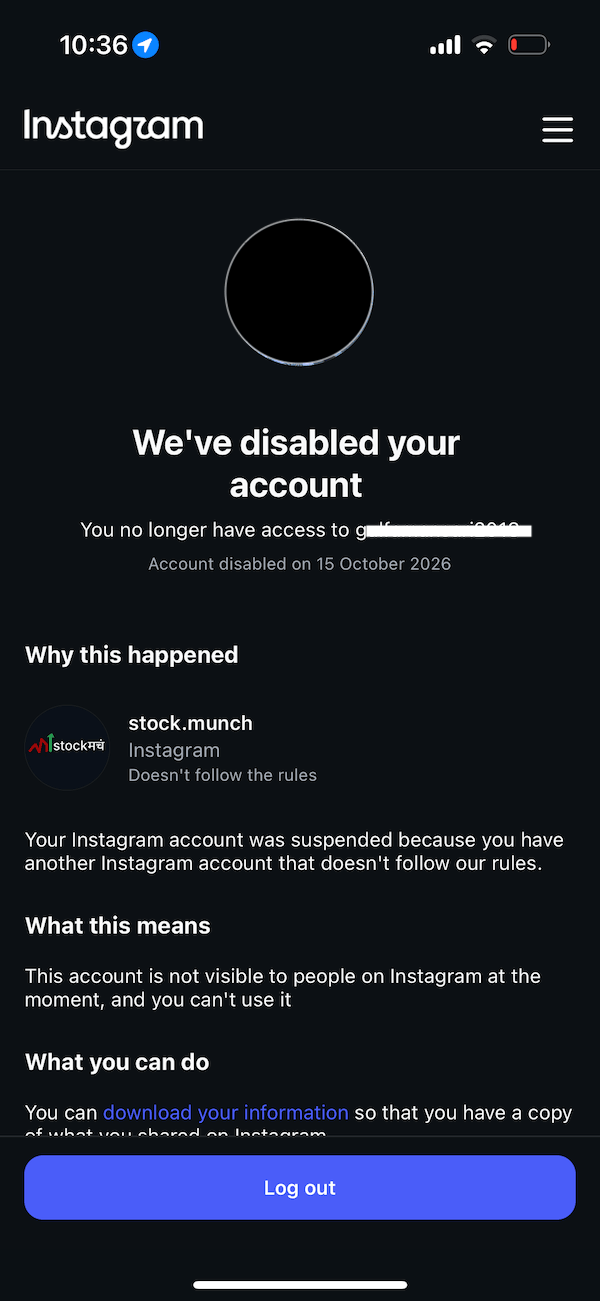
The Instagram account @stock.munch received an enforcement notice saying “fraud and deception.” I used to publish the latest stock market news so that StockMunch followers could use it for informational purposes. I also used to post learning content. So, once I saw the notice, I followed all the steps to appeal the decision.
The StockMunch account was later permanently disabled. That was particularly frustrating because it was a business-focused account used to share market information, not an account I expected to lose access to without a clear explanation of the specific issue.
The situation did not stop there. My personal Instagram account also became unavailable. I submitted an appeal on 15 October 2026. The message shown to me said that the appeal had been submitted, that the account was not visible to other people while the review was in progress, and that the account could be permanently disabled if Instagram upheld its decision.
I also found out that my Facebook account had been suspended, even though I had not been using it for years. I assume the reason for disabling all these accounts was that they were connected to the same email address.
So, I did some research and found that Meta Verified support could help. I purchased Meta Verified through a friend's account and logged in on my device. I spoke with a human support representative through Meta Verified, and they initiated a manual review of my account. After two days, they gave me the same reason and disabled my account. However, my concern is this: if StockMunch was not following the guidelines, why were my personal accounts also suspended?
After that, I also contacted grievance channels in India and raised the issue through the Grievance Appellate Committee process. I am waiting for a response from the grievance channels.
Instagram Suspended vs. Disabled vs. Hacked: What Is the Difference?
These situations can look similar, but they may require different steps:
Suspended or disabled account: First instagram suspened your account whenever their system flag your account and then after failed review your account status changes to disabled. In both the cases you can not use your account.
Appeal under review: You have submitted your appeal but instagram did not give your final conclusion. it will take some time to review your case.
Hacked or compromised account: If someone tries to login into your account and changed the password or username.
Login problem: Verification proble, logic issues or even network problem can prevent you to access your account.
Read the meta guidelines before taking any actions. For a disabled account, you can visit the official Instagram disabled-account guidance. If someone accessed your account then, visit the Instagram Help Center and look for the hacked account recovery options.
How to Appeal an Instagram Suspension
Step 1: Try Logging In Through the Official Instagram App
Open instagram and login with your credentials. If you see a suspension notice then read it very carefully because appeal process may vary for each user depending on the penalty.
Step 2: Explain Your Situation Clearly
Now if your appeal takes you to explain the situation then explain it clearly. Keep the explanation factual and be respectful. If the app ask you to upload a selfie, find a good environment to ensure the image is clear.
Hello Instagram Support,
My account has been suspended or disabled, and I believe the decision may have been made in error. I would appreciate a review of my account and the content or activity that led to this decision. I am willing to complete any identity or security verification requested through Instagram's official process.
Thank you for reviewing my request.
Step 3: Complete Any Verification Request
Instagram may ask you to confirm your identity by uploading a selfie , email address, phone number, or run an identity check using facial recognition.
Step 4: Check Your Email
Check your email after the submission of the appeal. You will get the confirmation that your appeal is accepted. Check your spam and social folder as well.
Step 5: Save Your Appeal Details
Once you get the confirmation of your submitted appeal, take a screenshot of the notice, appeal, and email. This will need to be used in an official support or grievance process.
What Should You Do If Your Instagram Appeal Is Pending?
Instagram did not provide any review timeline, the review time is depends on the case by case. Delaying the appeal does not mean that your appeal is rejected. Meta has lots of appeals in their pipeline, so a dealy could be happen.
While you wait:
Check your email and login screen for updates periodically.
If any verification is repeated again after appeal then complete the verification.
Avoid sending repeated requests through unofficial channels.
Do not pay anyone who restores your account.
Can Instagram Disable Other Accounts Linked to the Same Device or Phone Number?
Lots of users claim that Meta disabled all their all accounts connected to the same mobile number or email address. I also experienced the same issue, after my @stock.munch account, Meta suspended my personal Instagram and Facebook accounts. Meta can disable all your accounts with the same mobile number, email address or even with the same device as well.
But if your other account is suspended because of the same device then the Meta can analyse some tests and restore your account immediately. This is my experience as my friend account was also suspended because I used that account to talk with human support on the same device.
What If Instagram Says Your Account Is Permanently Disabled?
A permanent disablement message is very serious. You can again talk with the human support using the Meta Verified if you have it. Also check whether further review option is still available.
If all else fails and you think that the decision is wrong then you can proceed with the official grievance or appeals process available in your country.
Keep your complaint factual, as mentioned earlier and attach all the relevant proof with your username, email address, mobile number and other required information. Don't include sensitive information like your password or any secret key.
Official Resources by Country/Region
- India: Grievance Appellate Committee (GAC)
- European Union: European Commission – Digital Services Act
- European Union: Appeals Centre Europe
- United States: Meta Oversight Board
- Australia: eSafety Commissioner
- United Kingdom: Ofcom – Online Safety
- Canada: Canadian Radio-television and Telecommunications Commission (CRTC)
Does Meta Verified Guarantee Access to a Real Support Agent?
Yes, because according to the Instagram Meta subscription features, they will assign real person to resolve your issues. The number of tickets resolved by the real person is differs by paid subscription plan. Each subscription plan comes with the number of tickets you can resolve with a real person.
But a paid subscription does not guarantee that a disabled Instagram account will be restored. In my case, I found the human support and talked with them on a phone call but the process can be differ from person to person.
Meta has announced changes to its account-support tools over time. For updates, consult Meta's official newsroom
How to Avoid Instagram Account Recovery Scams
When an account is suspended, the user tries to find any help online, and because of that scammers can trap you. So be cautious, as no one except the Meta team can restore your account.
Never share your password or login codes.
Do not pay for guaranteed recovery.
Avoid unknown recovery software.
Secure your email account.
How to Protect Your Instagram Account in the Future
No security measure can guarantee that the account will never be suspended or disabled. But you can maintain a good hygiene and constantly check the security settings in the Instagram app.
Review all connected apps and dont use third party apps.
Avoid automatic tools to gain fake followers, likes and comments.
Read Instagram's Community Guidelines carefully.
Official Links for Instagram Account Help
Last reviewed: 24 October 2026. Instagram's interfaces and support options can change, so check the official help pages for the latest instructions.